Best Wound Care EHR Software
Best Wound Care EHR Software for Modern Wound Clinics with AI-Assisted Workflows
Choosing the best wound care EHR software is critical for improving clinical workflows, wound documentation accuracy, imaging management, billing efficiency, reporting, and patient outcomes. Modern wound care clinics require specialized EHR systems that support wound measurements, AI-assisted charting, treatment planning, compliance, and interoperability.
This guide explains the key features, benefits, implementation considerations, and workflow capabilities that healthcare providers should evaluate when selecting wound care EHR software.
What Is the Best Wound Care EHR Software?
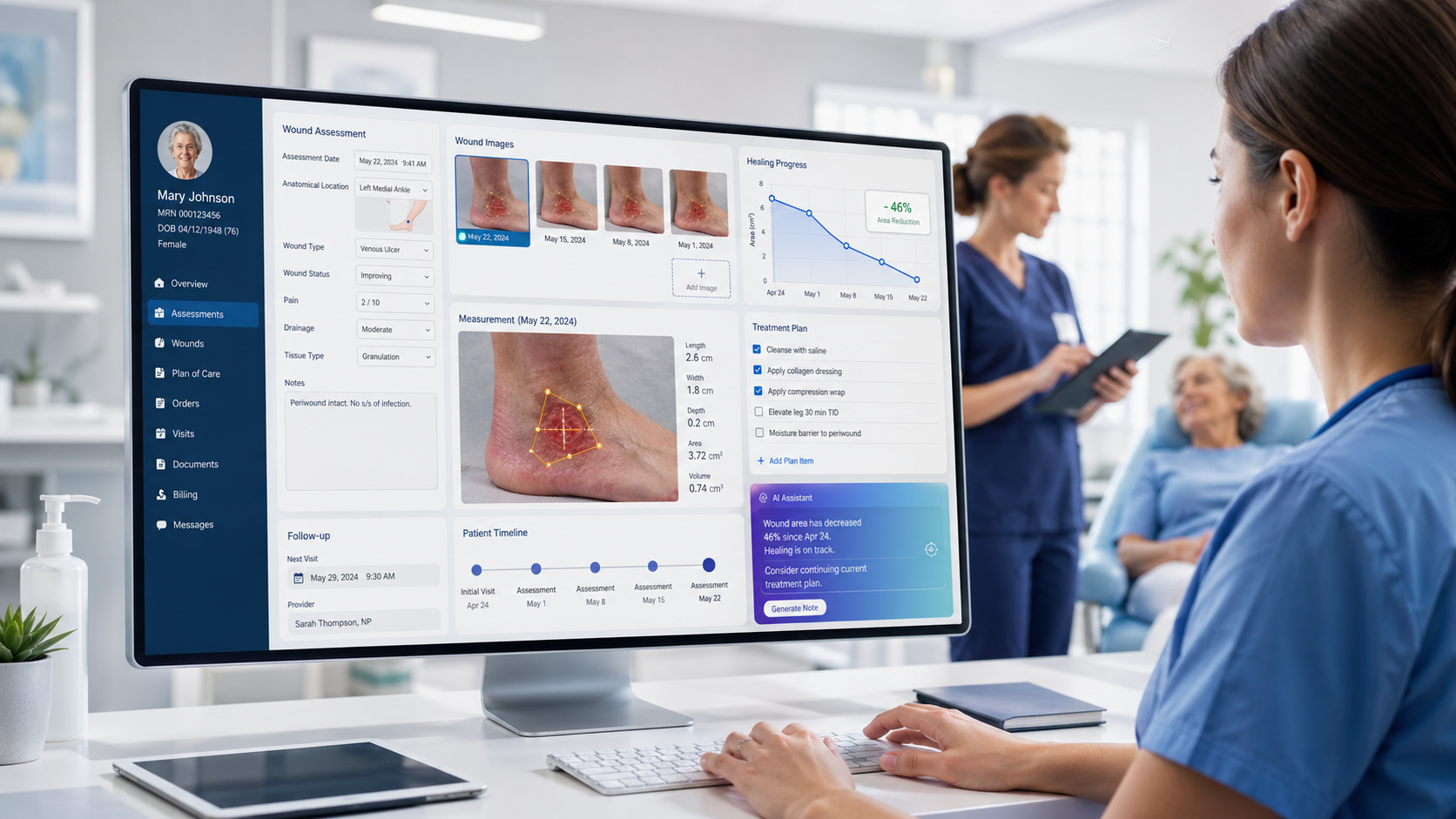
The best wound care EHR software is the system that supports the full wound care workflow: wound documentation, image capture, measurement tracking, treatment planning, procedure notes, billing workflow support, reporting, implementation, and provider-reviewed AI-assisted documentation.
For wound care-heavy clinics and specialty practices, a dedicated wound care EHR workflow is often a better fit than a general EHR template because wound care requires repeated visit tracking, visual documentation, wound measurements, treatment changes, and structured follow-up.
Healthcare Workflow Expertise
Our wound care EHR workflow recommendations are based on real-world healthcare documentation requirements, billing workflows, interoperability standards, and clinical efficiency best practices used by wound care providers and specialty clinics.
The platform supports secure workflows, specialty documentation requirements, imaging management, treatment tracking, reporting, and operational optimization for wound care practices.
How to Evaluate the Best Wound Care EHR Software
A best wound care EHR decision should be based on workflow fit, documentation quality, image and measurement handling, billing support, reporting visibility, implementation needs, and user adoption, not only a vendor's marketing claims or feature list.
A strong evaluation process should look at how the software supports the daily work of providers, nurses, billing teams, administrators, and practice owners.
| Evaluation Area | Why It Matters |
|---|---|
| Wound documentation depth | Determines how well the system supports structured wound visits, clinical notes, and follow-up planning. |
| Imaging workflow | Helps providers organize wound photos by patient, wound, visit, and timeline. |
| Measurement tracking | Supports review of length, width, depth, area, and wound progress across multiple visits. |
| Treatment planning | Helps teams document dressing changes, offloading, compression, procedures, and follow-up care. |
| Billing documentation support | Helps billing teams review procedure details, diagnosis information, and supporting documentation. |
| Reporting visibility | Supports clinical, operational, and administrative review. |
| AI-assisted workflow support | May help reduce repetitive documentation while keeping provider review in place. |
| Implementation fit | Affects training, adoption, setup, migration planning, and long-term success. |
| Integrations | Helps connect the wound care workflow with existing practice systems when needed. |
| Privacy and security review | Helps organizations evaluate access controls, audit logs, user permissions, data handling, and compliance responsibilities. |
What Makes Wound Care EHR Software the Best Fit for a Practice?
The best wound care EHR software should help teams manage the clinical, visual, administrative, and billing-related details of wound care in one organized workflow.
1. Specialty Wound Documentation
Look for structured documentation fields for wound type, location, size, depth, tissue, drainage, odor, pain level, infection indicators, treatment response, and follow-up plan.
2. Wound Imaging Workflow
The system should make it easier to connect wound photos to the correct patient, wound, visit date, provider, and wound timeline.
3. Measurement Tracking
A strong wound care EHR should support length, width, depth, area, and wound progress tracking across multiple visits.
4. Treatment Planning
Evaluate workflows for dressing changes, offloading, compression, debridement plans, follow-up visits, and care plan updates.
5. Billing Documentation Support
The software should help organize procedure details, diagnosis information, treatment notes, and supporting documentation for billing workflow review.
6. Reporting and Analytics
Look for reporting that supports wound progress, documentation activity, productivity visibility, provider workflow review, and operational insight.
7. AI-Assisted Workflow Support
AI-assisted features should support documentation, prompts, image organization, and workflow consistency while keeping licensed clinical users in control.
8. Implementation and Training
The best software should align with your team’s size, specialty, training needs, implementation timeline, and support expectations.
9. User Role Support
Providers, nurses, medical assistants, billing teams, administrators, and clinic owners should each have access to the information they need.
10. Integration and Data Workflow
Ask whether the system can support your existing practice management, billing, reporting, imaging, or hospital workflow needs.
Best Wound Care EHR Software by Practice Type
The best wound care EHR may look different depending on your care setting, patient volume, specialty, documentation needs, billing workflow, and reporting requirements.
Wound Care Clinics
Best fit: software that supports high-volume wound documentation, wound photos, measurement tracking, recurring visits, billing workflow review, and reporting.
Podiatry Practices
Best fit: workflows for diabetic foot ulcers, offloading plans, recurring wound visits, wound imaging, treatment tracking, and measurement history.
Vascular Practices
Best fit: chronic wound tracking, vascular-related documentation, measurement history, image timelines, and care coordination workflows.
Diabetic Wound Care Providers
Best fit: ulcer documentation, healing progress tracking, treatment response, follow-up history, and patient-specific wound timelines.
Outpatient Wound Centers
Best fit: frequent visits, procedures, treatment plans, documentation, billing workflow support, reporting, and operational visibility.
Home Health Teams
Best fit: mobile wound documentation, wound photo capture, measurement tracking, reviewer communication, and care coordination.
Long-Term Care Organizations
Best fit: pressure injury tracking, dressing changes, care plan updates, resident wound records, reporting, and team communication.
Hospitals and Healthcare Groups
Best fit: workflow consistency, specialty documentation, reporting visibility, user roles, integrations, and implementation planning.
Core Features in Wound Care EHR Software
Before choosing a wound care EHR, compare how each option supports daily clinical work, billing review, reporting, implementation, and long-term usability.
Wound Documentation Software
Look for structured wound assessments, SOAP notes, wound location, size, depth, tissue type, drainage, odor, pain level, treatment response, and follow-up planning.
Wound Imaging Software
Evaluate how images are captured, stored, labeled, compared, and connected to the correct patient, wound, provider, visit, and timeline.
Wound Measurement Software
Compare workflows for length, width, depth, surface area, wound progression, healing trends, and measurement history.
Wound Care Templates
Ask whether the system supports documentation workflows for diabetic ulcers, pressure injuries, venous ulcers, arterial ulcers, surgical wounds, burns, and traumatic wounds.
Treatment Planning
Review support for dressing changes, compression therapy, offloading, debridement plans, follow-up care, and care plan updates.
Billing and Coding Support
Ask how the system supports procedure documentation, diagnosis details, CPT and ICD workflow review, and billing team visibility.
Reporting and Analytics
Evaluate wound progress reports, documentation activity, provider productivity, patient status, and clinic-level reporting.
AI-Assisted Documentation
Ask how AI-assisted prompts support documentation, consistency, and workflow efficiency without replacing provider review.
User Roles and Access
Review how providers, nurses, billing teams, administrators, and owners access the information they need.
Implementation and Training
Ask about setup, migration, training, support, timelines, user onboarding, and workflow configuration.
Wound Care EHR Software Vendors and Categories to Compare
Before choosing software, compare both dedicated wound care EHR platforms and wound assessment tools. This comparison is not a ranking. It is a practical framework to help providers understand what each type of solution may be best suited for.
| Vendor or Category | Common Positioning | Best-Fit Buyer | What to Verify in Demo |
|---|---|---|---|
| Wound Care EHR powered by 1st Providers Choice | Dedicated wound care EHR evaluation path with demo, pricing, and workflow support | Clinics wanting focused wound care workflow guidance | Documentation, imaging, measurement tracking, billing support, reporting, AI-assisted workflow, implementation |
| Specialty wound care EHR platforms | Wound-focused documentation, imaging, reporting, and workflow tools | Wound centers and specialty practices | Pricing, workflow fit, implementation scope, integrations, reporting |
| Wound imaging and measurement tools | Image capture, measurement tracking, wound progress, and visual documentation | Teams needing stronger wound image and measurement workflows | Whether the tool replaces or integrates with the EHR |
| General EHR systems | Broad charting across multiple specialties | Multi-specialty practices needing general documentation | Wound-specific customization, image timeline, measurement tracking, billing workflow |
| Enterprise wound platforms | Advanced analytics, enterprise reporting, multi-site workflows | Larger organizations and health systems | Complexity, cost, implementation timeline, user adoption |
| Wound assessment apps | Focused wound assessment, photos, measurements, and progress tracking | Teams mainly needing assessment support | Full documentation, billing, reporting, and EHR workflow support |
Dedicated Wound Care EHR vs General EHR vs Wound Assessment Apps
Not every wound care software option solves the same problem. The right choice depends on whether your team needs full documentation, wound images, measurements, billing workflow support, reporting, or a focused add-on tool.
| Category | Best For | Limitation to Check |
|---|---|---|
| Dedicated Wound Care EHR | Full wound documentation, imaging, measurements, billing, reporting, and follow-up workflow | Verify implementation, pricing, and integration needs. |
| General EHR | Broad multi-specialty charting | May require wound-specific customization. |
| Wound Assessment App | Wound photos, measurements, and assessment tools | May not replace a full EHR workflow. |
| Enterprise Wound Platform | Large organizations needing advanced analytics and scale | May be complex or heavy for smaller clinics. |
For wound care-heavy practices, the best option is usually the one that reduces manual tracking, keeps wound-specific information organized, and supports the full visit workflow from assessment to follow-up.
AI-Assisted Workflows
Should the Best Wound Care EHR Include AI-Assisted Features?
AI-assisted features can help support documentation efficiency, structured prompts, image organization, measurement review, and workflow consistency. However, AI should support clinical users, not replace them.
The best wound care EHR software should keep provider review and control at the center of the workflow.
Does AI support documentation instead of making clinical decisions?
Are providers able to review and edit AI-assisted notes?
Are smart prompts wound-specific?
Can AI-assisted workflows help reduce repetitive documentation?
Does the system avoid unsupported diagnosis or treatment claims?
Is AI explained clearly during the demo?
Can users understand what AI-assisted output means?
Can the provider remain in control of final documentation?
AI-assisted workflow support should not be presented as diagnosing wounds, selecting treatment independently, or replacing provider judgment.
Billing and Documentation Questions to Ask Before Choosing Wound Care EHR Software
Wound care documentation often supports more than clinical notes. It may also support procedure review, billing workflow, internal documentation standards, and operational reporting.
Procedure Documentation
Ask how the system supports documentation for debridement, dressing changes, graft-related workflows, procedures, and follow-up care.
Diagnosis Details
Ask how diagnosis information, wound type, clinical details, and treatment notes are organized for review.
Billing Team Visibility
Billing teams should be able to review supporting documentation without relying on disconnected notes or manual searches.
Documentation Consistency
Structured templates and prompts can help teams capture important visit details more consistently.
Reporting for Internal Review
Reports may help teams review documentation activity, incomplete notes, workflow trends, and operational needs.
Safe Language Reminder
Use “billing workflow support” and “documentation support.” Do not claim that software guarantees reimbursement, prevents denials, or ensures claim approval.
How Much Does Wound Care EHR Software Cost?
Wound care EHR pricing can vary based on practice size, number of providers, number of locations, selected features, implementation needs, integrations, training, support, and whether the system is used as a full EHR or alongside other systems.
| Pricing Factor | Why It Matters |
|---|---|
| Number of providers | Pricing may scale by provider, user, or license count. |
| Number of locations | Multi-location practices may need additional setup, reporting, and workflow configuration. |
| Feature set | Imaging, measurement tracking, AI-assisted workflows, billing, and reporting may affect pricing. |
| Implementation | Setup, configuration, migration, and training may affect the total cost. |
| Integrations | Billing, labs, portals, imaging, hospital EHR, or practice management integrations may require extra planning. |
| Support level | Support, onboarding, and training models may vary by vendor. |
| Deployment model | Cloud, hosted, or enterprise deployment requirements can affect pricing and implementation. |
| Data migration | Moving existing records, templates, or workflows may require additional review. |
| Training needs | Larger teams may require role-based training for providers, nurses, billing, and administrators. |
| Custom workflows | Specialty templates or workflow configuration may affect implementation planning. |
Implementation Questions to Ask Before Choosing a Wound Care EHR
Even strong software can fail if implementation is unclear. Wound care teams should ask how setup, training, migration, templates, user roles, and post-launch support will be handled.
How long does implementation usually take?
What training is included for providers, nurses, billing teams, and administrators?
Can workflows be configured by specialty or care setting?
Can existing templates or documentation processes be reviewed?
What support is available after launch?
How are user roles and permissions configured?
What migration or data transfer options are available?
How are current wound images, notes, or documents handled?
What does the go-live process look like?
Who helps users after the first training session?
The best wound care EHR is not only the best software on demo day. It should also be realistic to implement, train, and use consistently in daily practice.
What Integrations Should Wound Care EHR Software Support?
Practices should ask whether the wound care EHR can work with existing healthcare systems, billing workflows, practice management tools, imaging workflows, labs, portals, or hospital EHRs where needed.
Practice management system
Billing or revenue cycle workflow
Lab orders and results
E-prescribing
Patient portal
Imaging or wound photo workflow
Hospital EHR interface
Reporting or analytics tools
Secure data export
User access and audit logs
Scheduling workflows
Document management
Referral workflows
Secure messaging or communication tools
Wound care EHR integrations may include practice management, billing, labs, e-prescribing, patient portals, imaging workflows, reporting tools, hospital EHR interfaces, and secure data export. Providers should verify integration availability during the demo.
Security, Privacy, and Compliance Questions to Ask
Healthcare organizations should evaluate privacy, security, access controls, audit logs, user permissions, data handling, hosting, integrations, and compliance responsibilities during the software review process.
How are user roles and permissions managed?
Does the system support audit logs?
How is patient data handled and stored?
What safeguards support privacy and security workflows?
What access controls are available?
How are integrations secured?
What documentation is available for compliance review?
How are user activity and record access tracked?
What backup or recovery processes are available?
What should the practice be responsible for internally?
Does the vendor avoid unsupported “100% HIPAA compliant” claims?
Avoid relying on broad compliance claims alone. Providers should review privacy, security, access control, audit logging, hosting, data handling, and internal compliance responsibilities during the vendor evaluation process.
Which Wound Care Software Type Is Right for Your Practice?
Use this decision tree to narrow your software evaluation before requesting a demo.
| Situation | Best Option to Evaluate |
|---|---|
| You need full charting, documentation, imaging, billing, and reporting | Dedicated wound care EHR |
| You already have an EHR but need better wound photos and measurements | Wound assessment or imaging app |
| You are a large organization with many locations | Enterprise wound platform |
| You need broad multi-specialty charting | General EHR with wound templates |
| You want provider-reviewed AI-assisted documentation | Wound care EHR with AI-assisted workflow support |
| You are mainly comparing pricing | Request custom pricing from each vendor |
| You have billing documentation challenges | Evaluate billing workflow support and procedure documentation |
| You are unsure which fits | Schedule a demo and compare workflow fit |
Choose based on your actual workflow: how your team documents wounds, stores images, tracks measurements, reviews procedures, supports billing, and follows patients over time.
Mistakes to Avoid When Choosing Wound Care EHR Software
The best wound care EHR decision comes from comparing workflow fit, not only demos, feature lists, or pricing.
Choosing Based Only on Price
Lower upfront cost may not help if the workflow creates extra documentation, image tracking, or billing review work.
Choosing a General EHR Without Reviewing Wound Workflows
A general EHR may need significant customization for wound images, measurements, procedures, and follow-up tracking.
Ignoring Wound Image Organization
If images are not organized by wound and visit timeline, progress review can become harder over time.
Treating Measurement Tracking as Optional
Wound measurements are central to reviewing progress and supporting consistent documentation.
Not Involving Billing Teams in the Demo
Billing teams may need to review procedure notes, diagnosis details, and supporting documentation.
Not Asking About Implementation and Training
Training, user roles, migration, setup, and support can affect adoption and long-term success.
Accepting AI Claims Without Provider Review Controls
AI-assisted workflows should keep clinical users in control of review and final documentation.
Not Asking About Reporting
Reporting can help administrators review productivity, documentation activity, wound progress, and operational trends.
Forgetting Integration Requirements
Practices should ask how the software connects with existing systems, billing workflows, portals, labs, or reporting tools.
Not Clarifying Follow-Up and Support
Before choosing a system, know who supports your team after the demo, during implementation, and after launch.
Questions to Ask During a Wound Care EHR Demo
Use these questions during a vendor demo to compare software options more effectively.
How does the software support wound-specific documentation?
Can wound photos be organized by patient, wound, visit, and timeline?
How are wound measurements tracked across visits?
Does it support diabetic ulcers, pressure injuries, venous ulcers, arterial ulcers, surgical wounds, burns, and chronic wounds?
How does the system support treatment planning and follow-up?
What billing workflow support is available?
Can billing teams review procedure details and supporting notes?
What reporting tools are included?
Does the software include AI-assisted documentation?
How does provider review work with AI-assisted notes?
What training and implementation support is available?
What integrations are available?
How is pricing structured?
What support is available after launch?
Can workflows be configured by role, specialty, or location?
What should our team prepare before implementation?
Why Consider Us
Why Consider Wound Care EHR Powered by 1st Providers Choice?
Wound Care EHR is a dedicated wound care EHR powered by 1st Providers Choice, helping providers evaluate software workflows for documentation, imaging, measurement tracking, treatment planning, billing support, reporting, and AI-assisted workflow support.
The connection with 1st Providers Choice gives providers a clear follow-up path for demo, pricing, and consultation questions.
Dedicated Wound Care Focus
The page is built around wound care documentation, imaging, measurements, billing, reporting, implementation, and AI-assisted workflows.
Powered by 1st Providers Choice
Demo, pricing, and consultation requests are handled by the 1st Providers Choice team.
Healthcare Software Context
1st Providers Choice supports healthcare software conversations around EHR, billing, and practice management needs.
Clear Demo Path
Providers can request a demo and discuss workflow, implementation, pricing, training, and next steps.
Transparent Buyer Journey
Visitors know who powers the website and who will review their request.
Buyer Checklist
Download the Wound Care EHR Buyer Checklist
Not ready to schedule a demo yet? Use the buyer checklist to compare wound care EHR features, demo questions, implementation needs, billing workflow support, AI-assisted documentation, reporting requirements, integrations, security questions, and vendor fit.
Wound documentation questions
Wound imaging requirements
Measurement tracking needs
AI-assisted documentation questions
Billing workflow review
Reporting and analytics questions
Pricing factors
Implementation and training needs
Integration questions
Security and privacy review
Vendor comparison notes
Demo preparation questions
FAQs
Best Wound Care EHR Software FAQs
What is wound care EHR software?
Wound care EHR software is a specialized electronic health record system designed for wound clinics, outpatient wound centers, podiatry providers, and healthcare organizations managing chronic wound treatment, documentation, imaging, billing, and patient monitoring.
How is wound care EHR different from general EHR systems?
Wound care EHR software includes specialized workflows for wound imaging, wound measurements, healing progression tracking, treatment templates, specialty billing support, and AI-assisted documentation that general EHR systems may not provide.
Does wound care EHR software support billing?
Yes. Many wound care EHR platforms support billing workflows, coding assistance, claims management, revenue cycle workflows, and specialty documentation requirements for wound care practices.
Can wound care EHR track wound healing progress?
Yes. Advanced wound care EHR software can track wound measurements, imaging, healing stages, treatment plans, and longitudinal patient progress over time.
Does wound care EHR support wound imaging?
Yes. Specialized wound care EHR systems often include secure wound imaging tools, image storage, annotation capabilities, and comparative healing analysis.
Is AI used in wound care documentation?
Many modern wound care EHR platforms now use AI-assisted workflows to improve documentation accuracy, automate repetitive charting tasks, and streamline clinical operations.
AI-Powered Workflows
Ready to See AI-Powered Wound Care EHR Workflows in Action?
Explore wound care EHR software workflows designed to support documentation, wound imaging, measurement tracking, treatment planning, billing workflow support, reporting, implementation, and AI-assisted workflow efficiency.
Wound Care EHR is powered by 1st Providers Choice, and demo, pricing, and consultation requests are handled by the 1st Providers Choice team.
Need faster assistance? Call +1 480-782-1116 for any urgent request, query, or question.